
Shoot
Capture from as many angles as possible. Phone, DSLR or UAV or 360 Drone.
Any video. A photorealistic 3D workspace. Shareable instantly.Generate, edit and annotate captures all in the browser.
Capture from as many angles as possible. Phone, DSLR or UAV or 360 Drone.
Upload the video onto Volugraph to generate a 3D capture.
Manage the 3D capture directly on your device. Private or shared.
Before & after
Film a ground or aerial video, upload it and get a 3D capture in your browser. Organised with your project and share instantly.
Navigate your site without being there.
Features
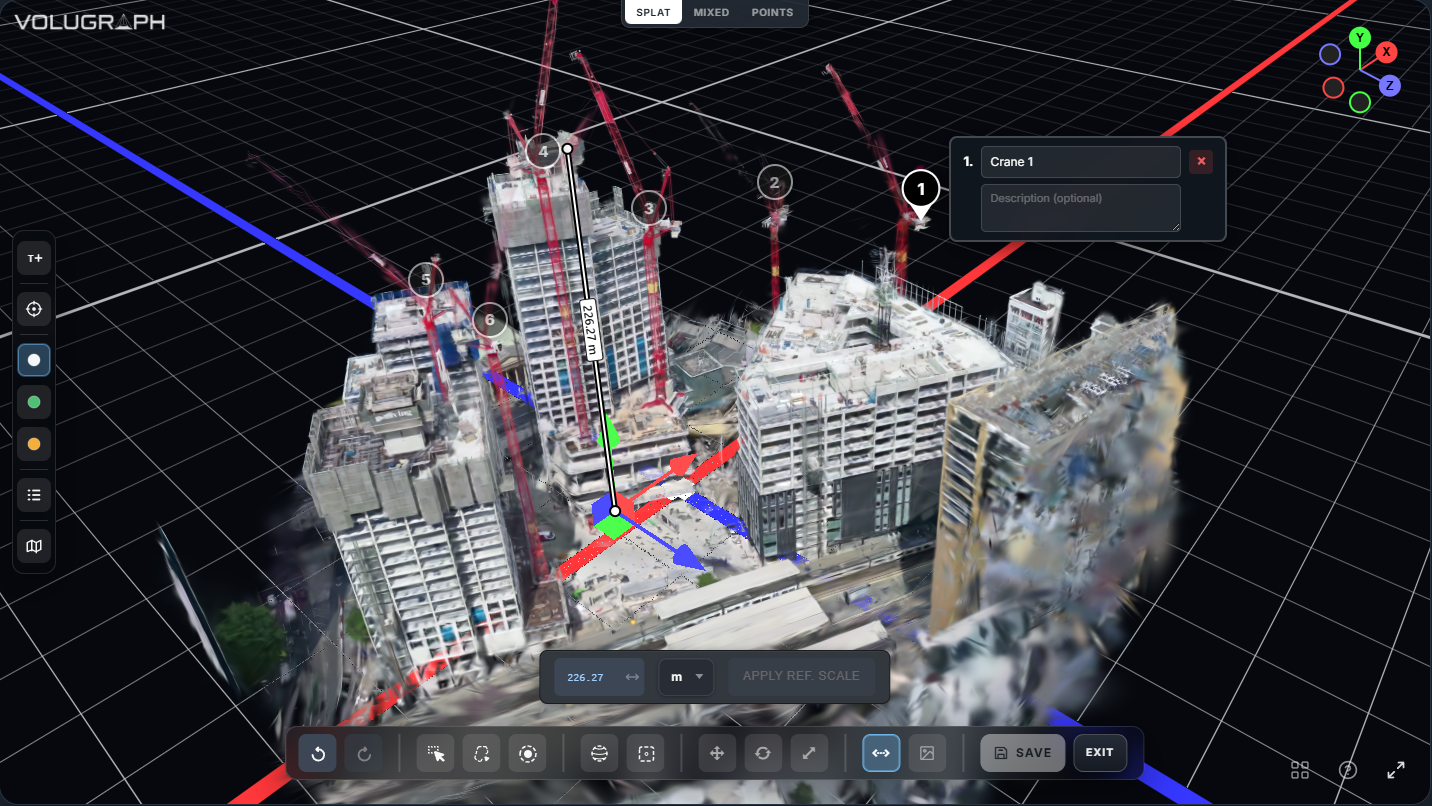
Use the native 3D Gaussian editor to shape your capture, set distances, and add detailed annotations directly in 3D space.
Using Volugraph
Getting to know Volugraph.
Slow, steady movements with good lighting and minimal motion blur work best for 3D Gaussian captures.
Learn moreMost captures finish within 30 minutes to an hour, depending on video length and complexity.
Learn moreYes. Volugraph includes a built-in 3D editor so you can delete and annotate sections of your capture.
Learn moreYes. Every scan can be shared with a public or private link or embedded on your site. Recipients open it in your browser.
Learn moreNo. Volugraph runs entirely in the browser. Capture, store, edit, and share—all from one app, with no installation or plugin.
Learn more


